
Connect to a U.S. exit node
- Locate the Tailscale icon in the Windows taskbar notification area, near the clock. If you do not see it, click the up arrow (Show hidden icons).
- Right-click the Tailscale icon to open its menu.
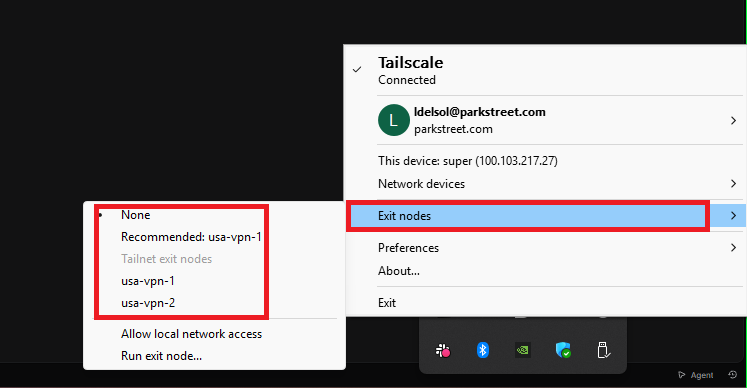
- Open Exit nodes.
- Select either of the available Park Street U.S. exit nodes:
- usa-vpn-1
- usa-vpn-2
- Allow a few moments for the connection to take effect, then reopen or refresh the website you need to access.
Both U.S. exit nodes are available. If you experience connection issues with one, try the other.
Tailscale menu reference
The screenshot below shows where to find Exit nodes and the two available U.S. connections.
Stop using the U.S. exit node
When you no longer need a U.S. IP address:
- Right-click the Tailscale icon in the taskbar notification area.
- Open Exit nodes.
- Select None.
This stops routing your internet traffic through the U.S. exit node; it does not sign you out of Tailscale.