
The below instructions will show you how to resolve the issue of “Incorrect Quantity of Sales Overview in Cases“ or “Cash reconciliation values are not pulling correct amount in cockpit“
Instructions
Please follow the below instructions:
- Go to the Navigator > Internal tools > Accounting tools > Cash Reconciliation tool
- Select Month for which having an issue and wait for to load data
- Search Client name
- And click on the refresh icon and wait for it to refresh it
- After finishing refresh generate closing doc and check
- if its related to Cash reconciliation values then login in to cockpit and check the cash reconciliation values.
PLease check below screenshot for more details:
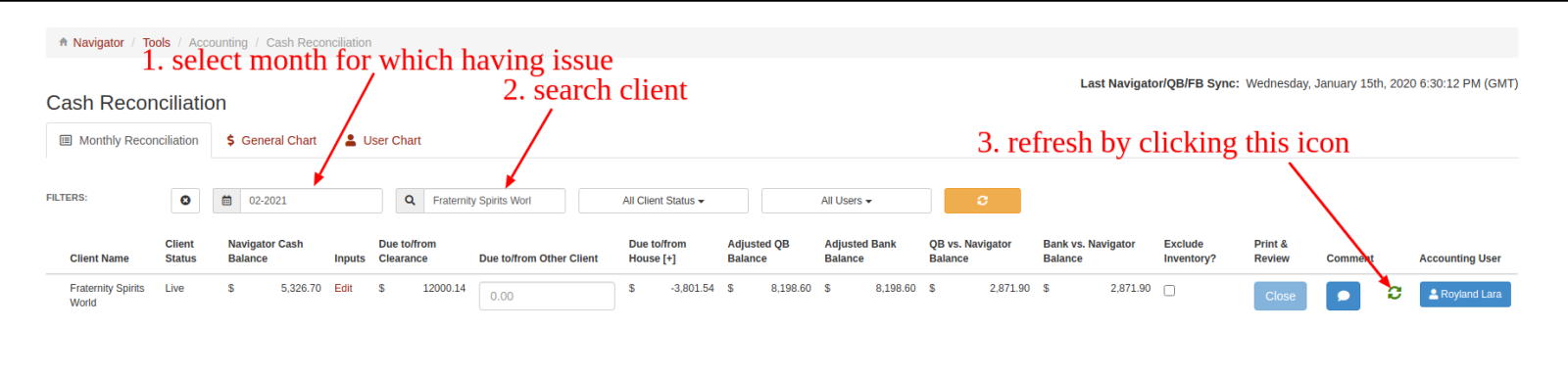
Select the month in which you having an issue.