
Instructions for adding your signature on Front and GMail
Step by step:
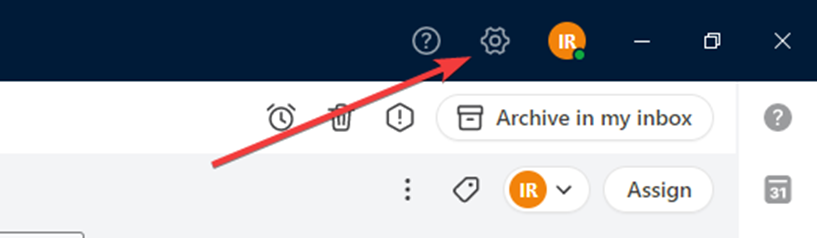
1. Go to Settings
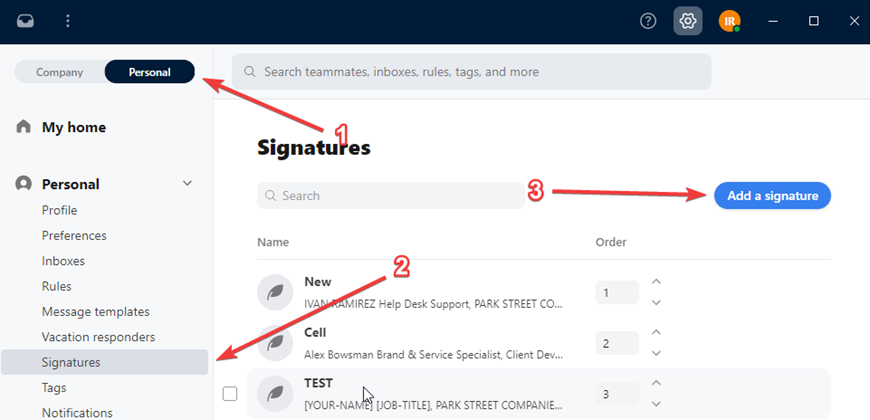
2. Click on Personal > Signatures > Add a Signature
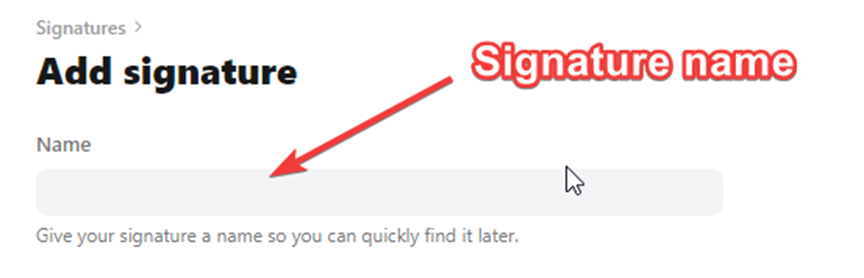
3. Write the name of your Signature
4. Email Code Block
Should you need the HTML code for the email signature, you may copy and paste the code below. This can be used in Front but will not work for Gmail.
Code Block for Aldenbridge Logistics Solutions Signature
<!DOCTYPE html>
<html lang="en">
<head>
<meta charset="UTF-8">
<meta name="viewport" content="width=device-width, initial-scale=1.0">
<title>Aldenbridge Logistics Solutions Email Signature</title>
</head>
<body style="margin:0;padding:0;background:transparent;">
<table role="presentation" cellpadding="0" cellspacing="0" border="0" width="560" style="width:560px;border-collapse:collapse;font-family:Arial, Helvetica, sans-serif;">
<tr>
<td valign="middle" width="150" style="width:150px;padding:0 20px 0 0;vertical-align:middle;">
<img src="https://psi-email-signature.s3.amazonaws.com/aldenbridge/ab-lockup-stacked.png" alt="Aldenbridge" width="150" height="53" border="0" style="display:block;width:150px;height:53px;border:0;outline:none;text-decoration:none;">
</td>
<td valign="middle" width="1" bgcolor="#D4D4D7" style="width:1px;padding:0;vertical-align:middle;background-color:#D4D4D7;font-size:0;line-height:0;"> </td>
<td valign="middle" width="369" style="width:369px;padding:0 0 0 20px;vertical-align:middle;">
<div style="margin:0;font-family:Arial, Helvetica, sans-serif;font-size:16px;line-height:20px;font-weight:700;color:#1D4277;">[YOUR-NAME]</div>
<div style="margin:0;font-family:Arial, Helvetica, sans-serif;font-size:13px;line-height:17px;font-weight:400;color:#1D1F20;">[JOB-TITLE]</div>
<div style="margin:0;font-family:Arial, Helvetica, sans-serif;font-size:13px;line-height:17px;font-weight:400;color:#1D1F20;">Aldenbridge Logistics Solutions</div>
<table role="presentation" cellpadding="0" cellspacing="0" border="0" width="100%" style="width:100%;border-collapse:collapse;margin:10px 0;">
<tr>
<td valign="middle" height="1" bgcolor="#D4D4D7" style="height:1px;line-height:1px;font-size:0;background-color:#D4D4D7;padding:0;"> </td>
</tr>
</table>
<table role="presentation" cellpadding="0" cellspacing="0" border="0" style="border-collapse:collapse;">
<tr>
<td valign="middle" width="13" style="width:13px;padding:0 8px 3px 0;vertical-align:middle;font-size:0;line-height:0;">
<img src="https://psi-email-signature.s3.amazonaws.com/aldenbridge/icon-phone.png" alt="" width="13" height="13" border="0" style="display:block;width:13px;height:13px;border:0;outline:none;text-decoration:none;">
</td>
<td valign="middle" style="padding:0 0 3px 0;vertical-align:middle;font-family:Arial, Helvetica, sans-serif;font-size:12px;line-height:17px;font-weight:400;color:#1D1F20;">
<a href="tel:[YOUR-PHONE-TEL]" style="color:#1D1F20;text-decoration:none;font-family:Arial, Helvetica, sans-serif;"><span style="color:#1D1F20;text-decoration:none;font-family:Arial, Helvetica, sans-serif;">[YOUR-PHONE]</span></a>
</td>
</tr>
<tr>
<td valign="middle" width="13" style="width:13px;padding:0 8px 3px 0;vertical-align:middle;font-size:0;line-height:0;">
<img src="https://psi-email-signature.s3.amazonaws.com/aldenbridge/icon-mail.png" alt="" width="13" height="13" border="0" style="display:block;width:13px;height:13px;border:0;outline:none;text-decoration:none;">
</td>
<td valign="middle" style="padding:0 0 3px 0;vertical-align:middle;font-family:Arial, Helvetica, sans-serif;font-size:12px;line-height:17px;font-weight:400;color:#1D1F20;">
<span style="color:#1D1F20;text-decoration:none;font-family:Arial, Helvetica, sans-serif;">[YOUR-EMAIL]</span>
</td>
</tr>
<tr>
<td valign="middle" width="13" style="width:13px;padding:0 8px 3px 0;vertical-align:middle;font-size:0;line-height:0;">
<img src="https://psi-email-signature.s3.amazonaws.com/aldenbridge/icon-link.png" alt="" width="13" height="13" border="0" style="display:block;width:13px;height:13px;border:0;outline:none;text-decoration:none;">
</td>
<td valign="middle" style="padding:0 0 3px 0;vertical-align:middle;font-family:Arial, Helvetica, sans-serif;font-size:12px;line-height:17px;font-weight:400;color:#1D1F20;">
<a href="https://www.aldenbridge.com" style="color:#1D1F20;text-decoration:none;font-family:Arial, Helvetica, sans-serif;"><span style="color:#1D1F20;text-decoration:none;font-family:Arial, Helvetica, sans-serif;">www.aldenbridge.com</span></a>
</td>
</tr>
<tr>
<td valign="middle" width="13" style="width:13px;padding:0 8px 0 0;vertical-align:middle;font-size:0;line-height:0;">
<img src="https://psi-email-signature.s3.amazonaws.com/aldenbridge/icon-pin.png" alt="" width="13" height="13" border="0" style="display:block;width:13px;height:13px;border:0;outline:none;text-decoration:none;">
</td>
<td valign="middle" style="padding:0;vertical-align:middle;font-family:Arial, Helvetica, sans-serif;font-size:12px;line-height:17px;font-weight:400;color:#1D1F20;">[YOUR-ADDRESS]</td>
</tr>
</table>
</td>
</tr>
</table>
</body>
</html>
Code Block for Aldenbridge Warehousing signature
<!DOCTYPE html>
<html lang="en">
<head>
<meta charset="UTF-8">
<meta name="viewport" content="width=device-width, initial-scale=1.0">
<title>Aldenbridge Warehousing Email Signature</title>
</head>
<body style="margin:0;padding:0;background:transparent;">
<table role="presentation" cellpadding="0" cellspacing="0" border="0" width="560" style="width:560px;border-collapse:collapse;font-family:Arial, Helvetica, sans-serif;">
<tr>
<td valign="middle" width="150" style="width:150px;padding:0 20px 0 0;vertical-align:middle;">
<img src="https://psi-email-signature.s3.amazonaws.com/aldenbridge/ab-lockup-stacked.png" alt="Aldenbridge" width="150" height="53" border="0" style="display:block;width:150px;height:53px;border:0;outline:none;text-decoration:none;">
</td>
<td valign="middle" width="1" bgcolor="#D4D4D7" style="width:1px;padding:0;vertical-align:middle;background-color:#D4D4D7;font-size:0;line-height:0;"> </td>
<td valign="middle" width="369" style="width:369px;padding:0 0 0 20px;vertical-align:middle;">
<div style="margin:0;font-family:Arial, Helvetica, sans-serif;font-size:16px;line-height:20px;font-weight:700;color:#1D4277;">[YOUR-NAME]</div>
<div style="margin:0;font-family:Arial, Helvetica, sans-serif;font-size:13px;line-height:17px;font-weight:400;color:#1D1F20;">[JOB-TITLE]</div>
<div style="margin:0;font-family:Arial, Helvetica, sans-serif;font-size:13px;line-height:17px;font-weight:400;color:#1D1F20;">Aldenbridge Warehousing</div>
<table role="presentation" cellpadding="0" cellspacing="0" border="0" width="100%" style="width:100%;border-collapse:collapse;margin:10px 0;">
<tr>
<td valign="middle" height="1" bgcolor="#D4D4D7" style="height:1px;line-height:1px;font-size:0;background-color:#D4D4D7;padding:0;"> </td>
</tr>
</table>
<table role="presentation" cellpadding="0" cellspacing="0" border="0" style="border-collapse:collapse;">
<tr>
<td valign="middle" width="13" style="width:13px;padding:0 8px 3px 0;vertical-align:middle;font-size:0;line-height:0;">
<img src="https://psi-email-signature.s3.amazonaws.com/aldenbridge/icon-phone.png" alt="" width="13" height="13" border="0" style="display:block;width:13px;height:13px;border:0;outline:none;text-decoration:none;">
</td>
<td valign="middle" style="padding:0 0 3px 0;vertical-align:middle;font-family:Arial, Helvetica, sans-serif;font-size:12px;line-height:17px;font-weight:400;color:#1D1F20;">
<a href="tel:[YOUR-PHONE-TEL]" style="color:#1D1F20;text-decoration:none;font-family:Arial, Helvetica, sans-serif;"><span style="color:#1D1F20;text-decoration:none;font-family:Arial, Helvetica, sans-serif;">[YOUR-PHONE]</span></a>
</td>
</tr>
<tr>
<td valign="middle" width="13" style="width:13px;padding:0 8px 3px 0;vertical-align:middle;font-size:0;line-height:0;">
<img src="https://psi-email-signature.s3.amazonaws.com/aldenbridge/icon-mail.png" alt="" width="13" height="13" border="0" style="display:block;width:13px;height:13px;border:0;outline:none;text-decoration:none;">
</td>
<td valign="middle" style="padding:0 0 3px 0;vertical-align:middle;font-family:Arial, Helvetica, sans-serif;font-size:12px;line-height:17px;font-weight:400;color:#1D1F20;">
<span style="color:#1D1F20;text-decoration:none;font-family:Arial, Helvetica, sans-serif;">[YOUR-EMAIL]</span>
</td>
</tr>
<tr>
<td valign="middle" width="13" style="width:13px;padding:0 8px 3px 0;vertical-align:middle;font-size:0;line-height:0;">
<img src="https://psi-email-signature.s3.amazonaws.com/aldenbridge/icon-link.png" alt="" width="13" height="13" border="0" style="display:block;width:13px;height:13px;border:0;outline:none;text-decoration:none;">
</td>
<td valign="middle" style="padding:0 0 3px 0;vertical-align:middle;font-family:Arial, Helvetica, sans-serif;font-size:12px;line-height:17px;font-weight:400;color:#1D1F20;">
<a href="https://www.aldenbridge.com" style="color:#1D1F20;text-decoration:none;font-family:Arial, Helvetica, sans-serif;"><span style="color:#1D1F20;text-decoration:none;font-family:Arial, Helvetica, sans-serif;">www.aldenbridge.com</span></a>
</td>
</tr>
<tr>
<td valign="middle" width="13" style="width:13px;padding:0 8px 0 0;vertical-align:middle;font-size:0;line-height:0;">
<img src="https://psi-email-signature.s3.amazonaws.com/aldenbridge/icon-pin.png" alt="" width="13" height="13" border="0" style="display:block;width:13px;height:13px;border:0;outline:none;text-decoration:none;">
</td>
<td valign="middle" style="padding:0;vertical-align:middle;font-family:Arial, Helvetica, sans-serif;font-size:12px;line-height:17px;font-weight:400;color:#1D1F20;">[YOUR-ADDRESS]</td>
</tr>
</table>
</td>
</tr>
</table>
</body>
</html>
Code Block for Aldenbridge Customs Brokerage signature
<!DOCTYPE html>
<html lang="en">
<head>
<meta charset="UTF-8">
<meta name="viewport" content="width=device-width, initial-scale=1.0">
<title>Aldenbridge Customs Brokerage Email Signature</title>
</head>
<body style="margin:0;padding:0;background:transparent;">
<table role="presentation" cellpadding="0" cellspacing="0" border="0" width="560" style="width:560px;border-collapse:collapse;font-family:Arial, Helvetica, sans-serif;">
<tr>
<td valign="middle" width="150" style="width:150px;padding:0 20px 0 0;vertical-align:middle;">
<img src="https://psi-email-signature.s3.amazonaws.com/aldenbridge/ab-lockup-stacked.png" alt="Aldenbridge" width="150" height="53" border="0" style="display:block;width:150px;height:53px;border:0;outline:none;text-decoration:none;">
</td>
<td valign="middle" width="1" bgcolor="#D4D4D7" style="width:1px;padding:0;vertical-align:middle;background-color:#D4D4D7;font-size:0;line-height:0;"> </td>
<td valign="middle" width="369" style="width:369px;padding:0 0 0 20px;vertical-align:middle;">
<div style="margin:0;font-family:Arial, Helvetica, sans-serif;font-size:16px;line-height:20px;font-weight:700;color:#1D4277;">[YOUR-NAME]</div>
<div style="margin:0;font-family:Arial, Helvetica, sans-serif;font-size:13px;line-height:17px;font-weight:400;color:#1D1F20;">[JOB-TITLE]</div>
<div style="margin:0;font-family:Arial, Helvetica, sans-serif;font-size:13px;line-height:17px;font-weight:400;color:#1D1F20;">Aldenbridge Customs Brokerage</div>
<table role="presentation" cellpadding="0" cellspacing="0" border="0" width="100%" style="width:100%;border-collapse:collapse;margin:10px 0;">
<tr>
<td valign="middle" height="1" bgcolor="#D4D4D7" style="height:1px;line-height:1px;font-size:0;background-color:#D4D4D7;padding:0;"> </td>
</tr>
</table>
<table role="presentation" cellpadding="0" cellspacing="0" border="0" style="border-collapse:collapse;">
<tr>
<td valign="middle" width="13" style="width:13px;padding:0 8px 3px 0;vertical-align:middle;font-size:0;line-height:0;">
<img src="https://psi-email-signature.s3.amazonaws.com/aldenbridge/icon-phone.png" alt="" width="13" height="13" border="0" style="display:block;width:13px;height:13px;border:0;outline:none;text-decoration:none;">
</td>
<td valign="middle" style="padding:0 0 3px 0;vertical-align:middle;font-family:Arial, Helvetica, sans-serif;font-size:12px;line-height:17px;font-weight:400;color:#1D1F20;">
<a href="tel:[YOUR-PHONE-TEL]" style="color:#1D1F20;text-decoration:none;font-family:Arial, Helvetica, sans-serif;"><span style="color:#1D1F20;text-decoration:none;font-family:Arial, Helvetica, sans-serif;">[YOUR-PHONE]</span></a>
</td>
</tr>
<tr>
<td valign="middle" width="13" style="width:13px;padding:0 8px 3px 0;vertical-align:middle;font-size:0;line-height:0;">
<img src="https://psi-email-signature.s3.amazonaws.com/aldenbridge/icon-mail.png" alt="" width="13" height="13" border="0" style="display:block;width:13px;height:13px;border:0;outline:none;text-decoration:none;">
</td>
<td valign="middle" style="padding:0 0 3px 0;vertical-align:middle;font-family:Arial, Helvetica, sans-serif;font-size:12px;line-height:17px;font-weight:400;color:#1D1F20;">
<span style="color:#1D1F20;text-decoration:none;font-family:Arial, Helvetica, sans-serif;">[YOUR-EMAIL]</span>
</td>
</tr>
<tr>
<td valign="middle" width="13" style="width:13px;padding:0 8px 3px 0;vertical-align:middle;font-size:0;line-height:0;">
<img src="https://psi-email-signature.s3.amazonaws.com/aldenbridge/icon-link.png" alt="" width="13" height="13" border="0" style="display:block;width:13px;height:13px;border:0;outline:none;text-decoration:none;">
</td>
<td valign="middle" style="padding:0 0 3px 0;vertical-align:middle;font-family:Arial, Helvetica, sans-serif;font-size:12px;line-height:17px;font-weight:400;color:#1D1F20;">
<a href="https://www.aldenbridge.com" style="color:#1D1F20;text-decoration:none;font-family:Arial, Helvetica, sans-serif;"><span style="color:#1D1F20;text-decoration:none;font-family:Arial, Helvetica, sans-serif;">www.aldenbridge.com</span></a>
</td>
</tr>
<tr>
<td valign="middle" width="13" style="width:13px;padding:0 8px 0 0;vertical-align:middle;font-size:0;line-height:0;">
<img src="https://psi-email-signature.s3.amazonaws.com/aldenbridge/icon-pin.png" alt="" width="13" height="13" border="0" style="display:block;width:13px;height:13px;border:0;outline:none;text-decoration:none;">
</td>
<td valign="middle" style="padding:0;vertical-align:middle;font-family:Arial, Helvetica, sans-serif;font-size:12px;line-height:17px;font-weight:400;color:#1D1F20;">[YOUR-ADDRESS]</td>
</tr>
</table>
</td>
</tr>
</table>
</body>
</html>
Code Block for Aldenbridge Freight Forwarding signature
<!DOCTYPE html>
<html lang="en">
<head>
<meta charset="UTF-8">
<meta name="viewport" content="width=device-width, initial-scale=1.0">
<title>Aldenbridge Freight Forwarding Email Signature</title>
</head>
<body style="margin:0;padding:0;background:transparent;">
<table role="presentation" cellpadding="0" cellspacing="0" border="0" width="560" style="width:560px;border-collapse:collapse;font-family:Arial, Helvetica, sans-serif;">
<tr>
<td valign="middle" width="150" style="width:150px;padding:0 20px 0 0;vertical-align:middle;">
<img src="https://psi-email-signature.s3.amazonaws.com/aldenbridge/ab-lockup-stacked.png" alt="Aldenbridge" width="150" height="53" border="0" style="display:block;width:150px;height:53px;border:0;outline:none;text-decoration:none;">
</td>
<td valign="middle" width="1" bgcolor="#D4D4D7" style="width:1px;padding:0;vertical-align:middle;background-color:#D4D4D7;font-size:0;line-height:0;"> </td>
<td valign="middle" width="369" style="width:369px;padding:0 0 0 20px;vertical-align:middle;">
<div style="margin:0;font-family:Arial, Helvetica, sans-serif;font-size:16px;line-height:20px;font-weight:700;color:#1D4277;">[YOUR-NAME]</div>
<div style="margin:0;font-family:Arial, Helvetica, sans-serif;font-size:13px;line-height:17px;font-weight:400;color:#1D1F20;">[JOB-TITLE]</div>
<div style="margin:0;font-family:Arial, Helvetica, sans-serif;font-size:13px;line-height:17px;font-weight:400;color:#1D1F20;">Aldenbridge Freight Forwarding</div>
<table role="presentation" cellpadding="0" cellspacing="0" border="0" width="100%" style="width:100%;border-collapse:collapse;margin:10px 0;">
<tr>
<td valign="middle" height="1" bgcolor="#D4D4D7" style="height:1px;line-height:1px;font-size:0;background-color:#D4D4D7;padding:0;"> </td>
</tr>
</table>
<table role="presentation" cellpadding="0" cellspacing="0" border="0" style="border-collapse:collapse;">
<tr>
<td valign="middle" width="13" style="width:13px;padding:0 8px 3px 0;vertical-align:middle;font-size:0;line-height:0;">
<img src="https://psi-email-signature.s3.amazonaws.com/aldenbridge/icon-phone.png" alt="" width="13" height="13" border="0" style="display:block;width:13px;height:13px;border:0;outline:none;text-decoration:none;">
</td>
<td valign="middle" style="padding:0 0 3px 0;vertical-align:middle;font-family:Arial, Helvetica, sans-serif;font-size:12px;line-height:17px;font-weight:400;color:#1D1F20;">
<a href="tel:[YOUR-PHONE-TEL]" style="color:#1D1F20;text-decoration:none;font-family:Arial, Helvetica, sans-serif;"><span style="color:#1D1F20;text-decoration:none;font-family:Arial, Helvetica, sans-serif;">[YOUR-PHONE]</span></a>
</td>
</tr>
<tr>
<td valign="middle" width="13" style="width:13px;padding:0 8px 3px 0;vertical-align:middle;font-size:0;line-height:0;">
<img src="https://psi-email-signature.s3.amazonaws.com/aldenbridge/icon-mail.png" alt="" width="13" height="13" border="0" style="display:block;width:13px;height:13px;border:0;outline:none;text-decoration:none;">
</td>
<td valign="middle" style="padding:0 0 3px 0;vertical-align:middle;font-family:Arial, Helvetica, sans-serif;font-size:12px;line-height:17px;font-weight:400;color:#1D1F20;">
<span style="color:#1D1F20;text-decoration:none;font-family:Arial, Helvetica, sans-serif;">[YOUR-EMAIL]</span>
</td>
</tr>
<tr>
<td valign="middle" width="13" style="width:13px;padding:0 8px 3px 0;vertical-align:middle;font-size:0;line-height:0;">
<img src="https://psi-email-signature.s3.amazonaws.com/aldenbridge/icon-link.png" alt="" width="13" height="13" border="0" style="display:block;width:13px;height:13px;border:0;outline:none;text-decoration:none;">
</td>
<td valign="middle" style="padding:0 0 3px 0;vertical-align:middle;font-family:Arial, Helvetica, sans-serif;font-size:12px;line-height:17px;font-weight:400;color:#1D1F20;">
<a href="https://www.aldenbridge.com" style="color:#1D1F20;text-decoration:none;font-family:Arial, Helvetica, sans-serif;"><span style="color:#1D1F20;text-decoration:none;font-family:Arial, Helvetica, sans-serif;">www.aldenbridge.com</span></a>
</td>
</tr>
<tr>
<td valign="middle" width="13" style="width:13px;padding:0 8px 0 0;vertical-align:middle;font-size:0;line-height:0;">
<img src="https://psi-email-signature.s3.amazonaws.com/aldenbridge/icon-pin.png" alt="" width="13" height="13" border="0" style="display:block;width:13px;height:13px;border:0;outline:none;text-decoration:none;">
</td>
<td valign="middle" style="padding:0;vertical-align:middle;font-family:Arial, Helvetica, sans-serif;font-size:12px;line-height:17px;font-weight:400;color:#1D1F20;">[YOUR-ADDRESS]</td>
</tr>
</table>
</td>
</tr>
</table>
</body>
</html>
5. Then we go back to Front, switch the editor from Visual mode to HTML mode and paste the content into the Textbox. Then you can switch back to Visual mode for easier editing.
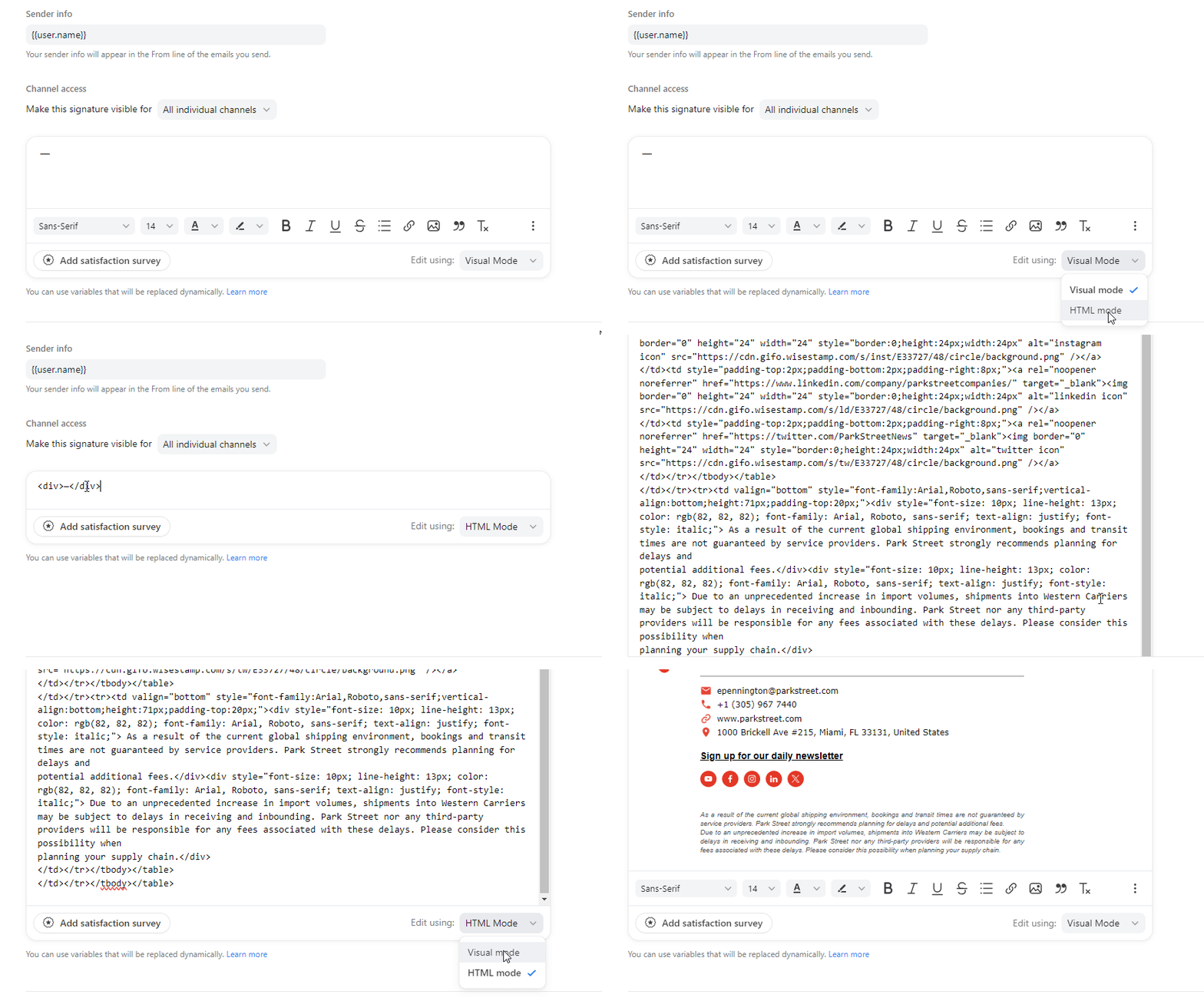
6. Adjust the details with your Name, Position, Phone extension, and Email addres. Position the cursor on each line then delete and type your own information. It is highly recommended to type manually to avoid affecting the code.
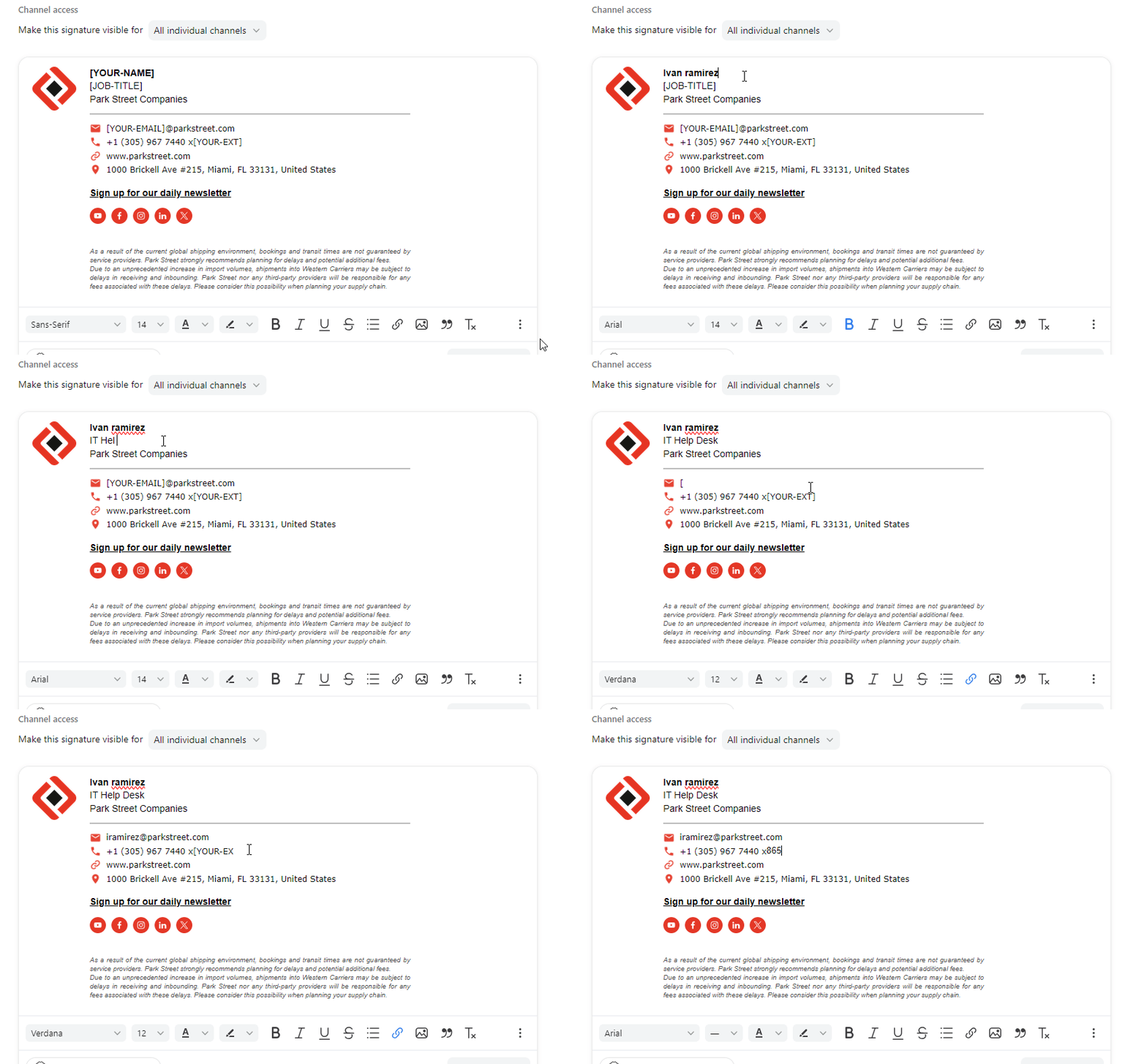
PS: To update correctly your Email address, it is necessary to completely delete the field and retype it. Once you type your email address, highlight it and click on the "Insert Link" button.
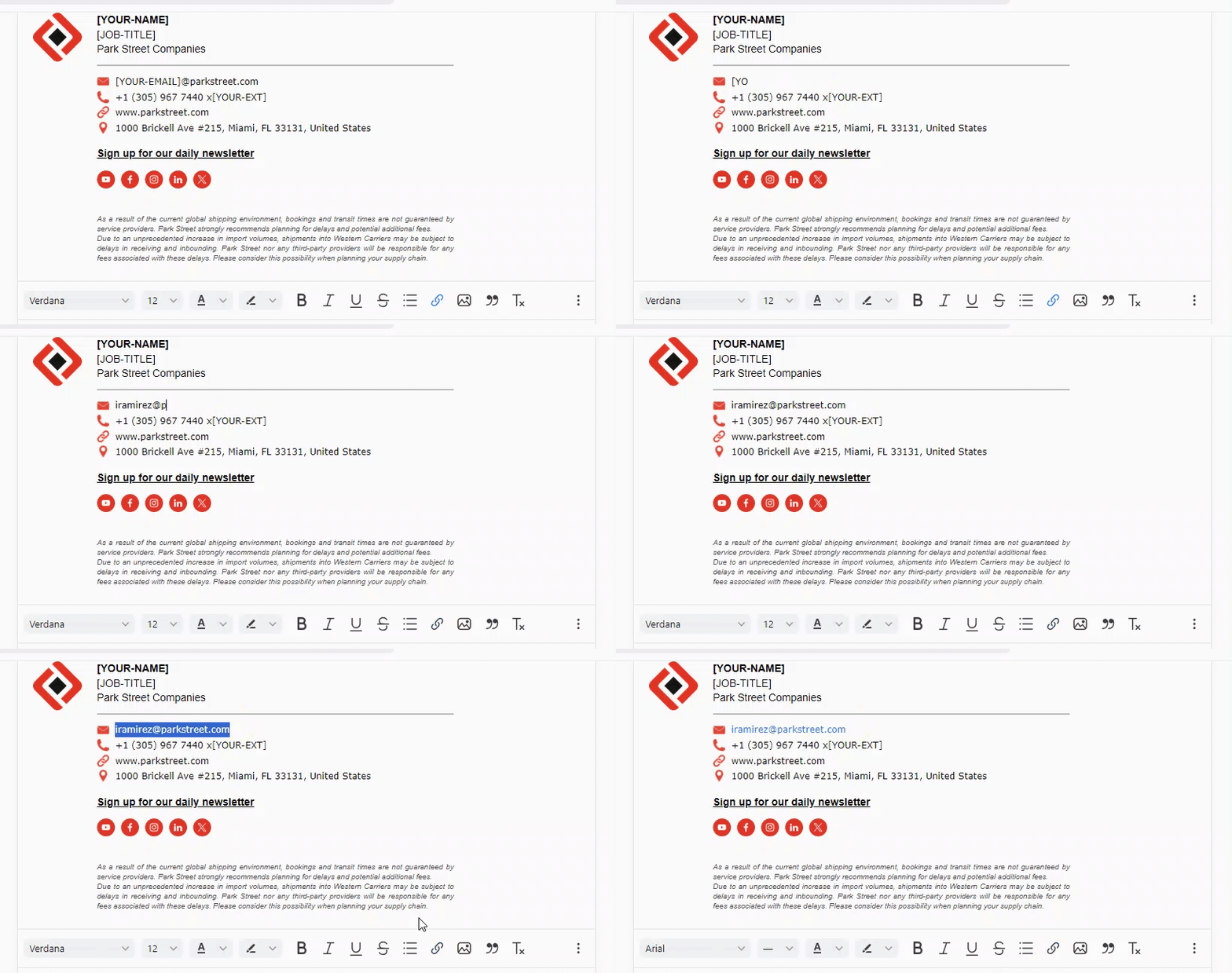
Please note: The shipping disclaimer is not necessary for all departments, only those it is relevant for. If you are unsure ask your director for clarification
7. Finish the process by clicking on Create.
Instructions for adding your signature on Gmail
1.- In order to add the email signature in Gmail, you can use the following template and just copy it using the keyboard shortcut "Ctrl + A" then right click and Copy.
Aldenbridge:
Aldenbridge Logistics Solutions
Aldenbridge Warehousing
Aldenbridge Customs Brokerage
Aldenbridge Freight Forwarding
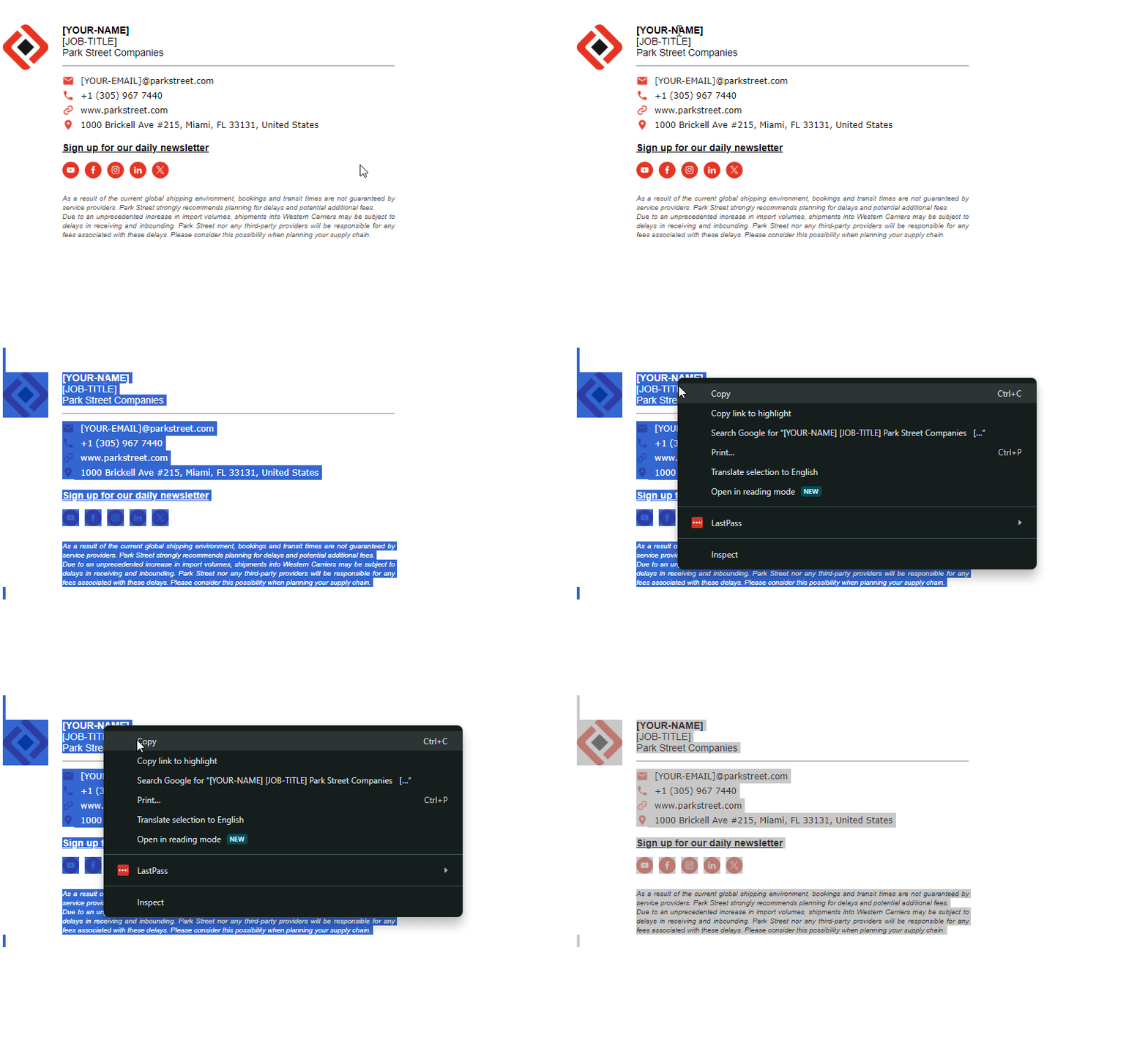
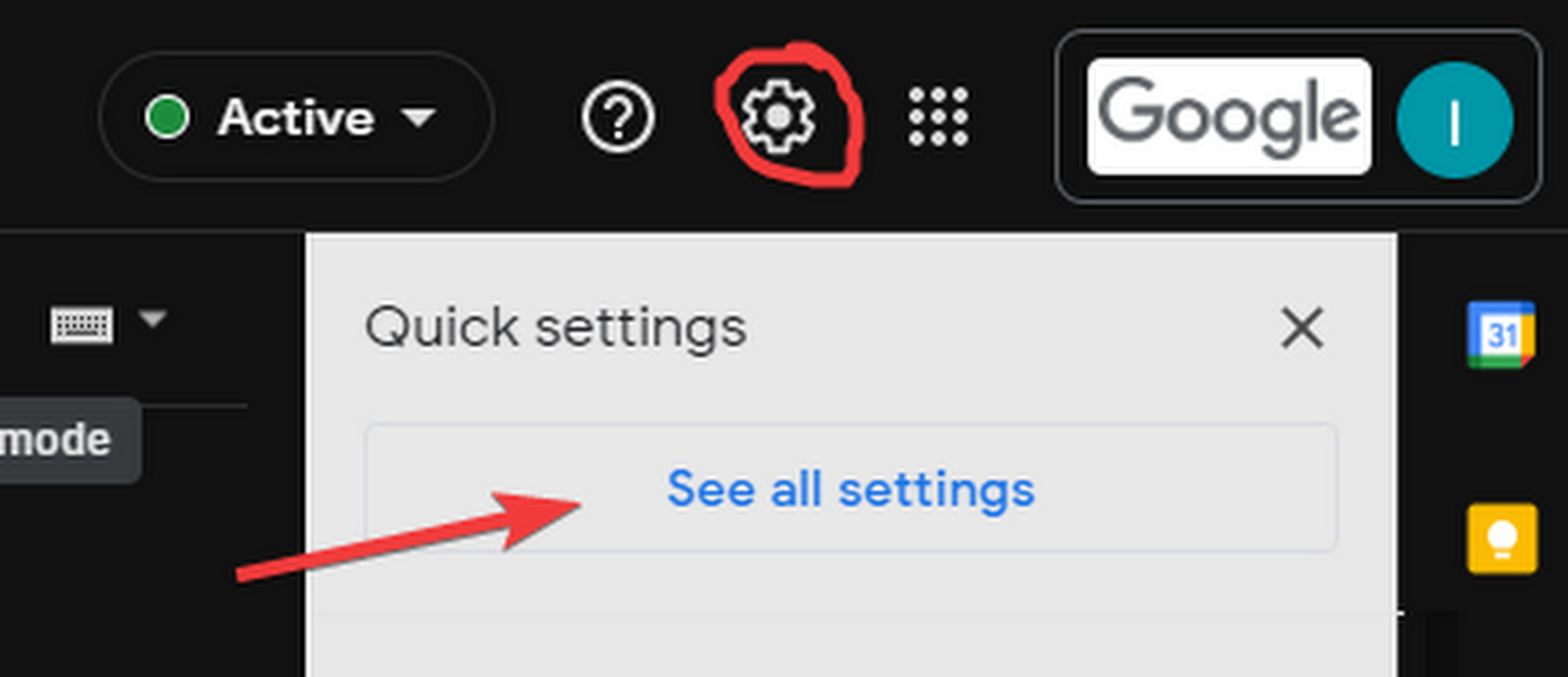
2.- Once you got it, go to Gmail and click on Settings (gear icon on the top right) and select “See all Settings”.
3.- Scroll down in the General tab to the Signature section, then click on “Create new”, type any name and click on Create.
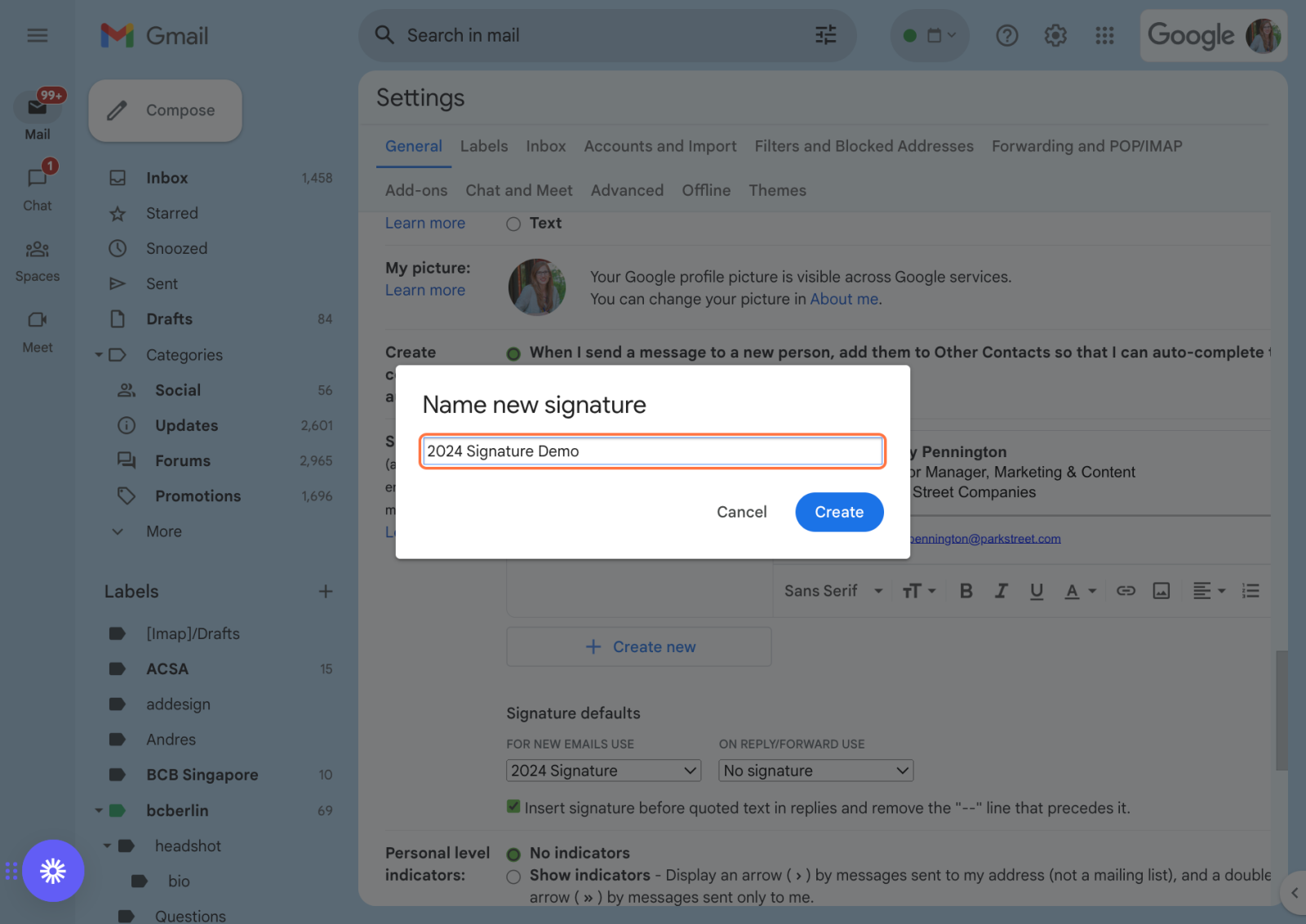
4.- Paste the Email Signature Template into the box.

5.- Adjust the details with your Name, Position, Phone extension, and Email. It is highly recommended to type manually to avoid affecting the Signature structure.
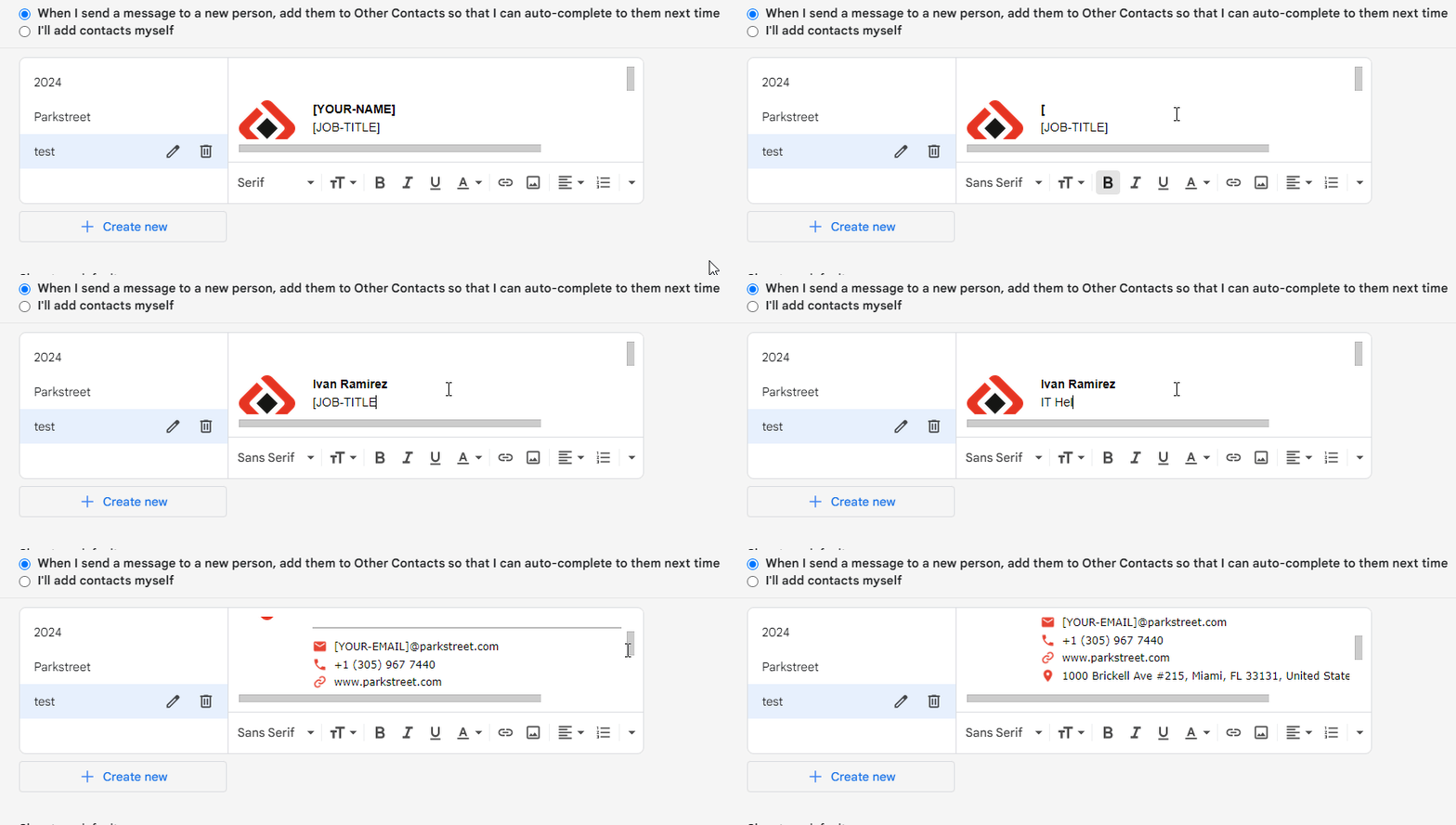
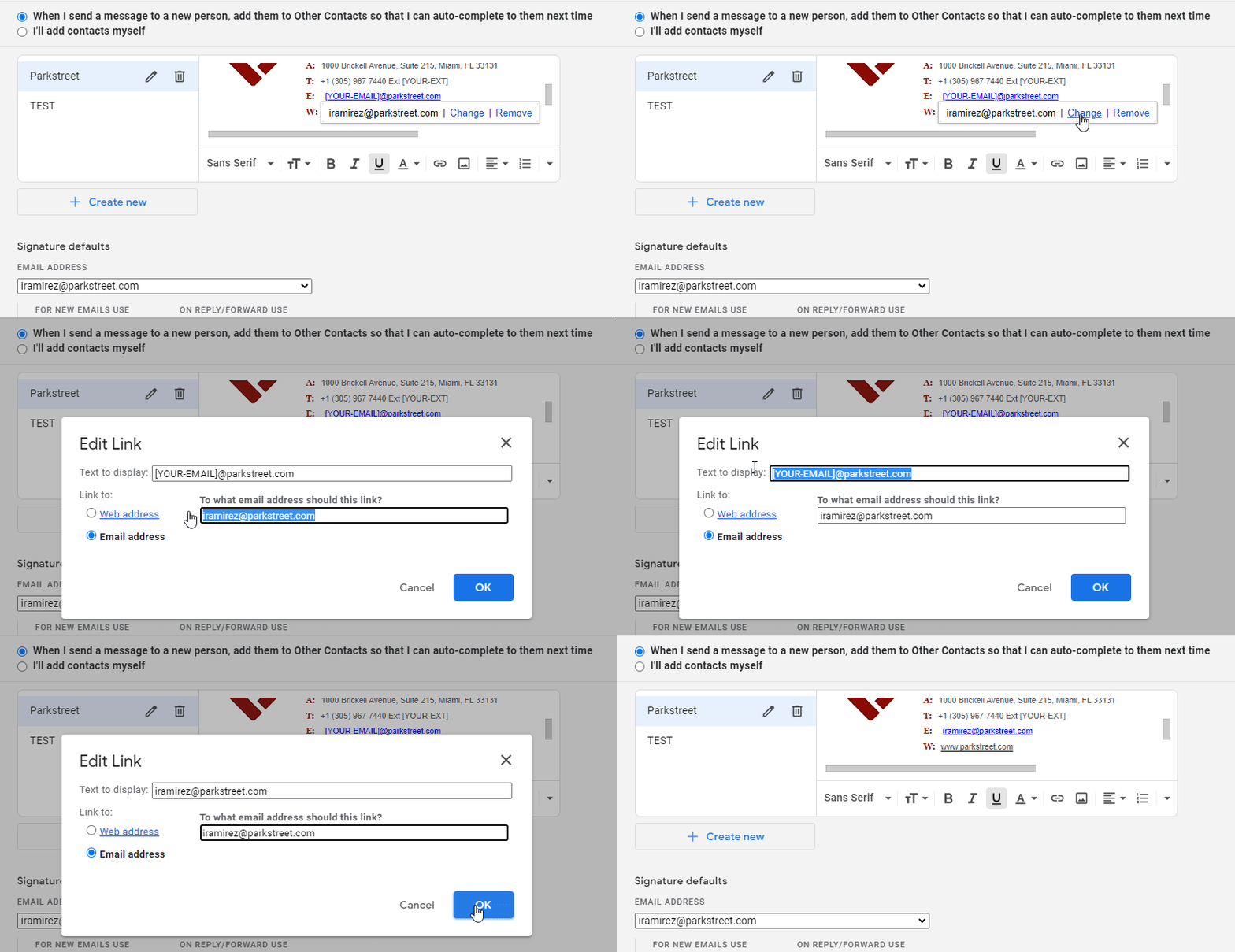
PS: To update correctly your Email address, hold your mouse cursor over the email link and left click. This will bring up a small window, click “Change” and delete or replace the text with your email signature in both fields (Text to display and Link to Email Address) , then click OK.
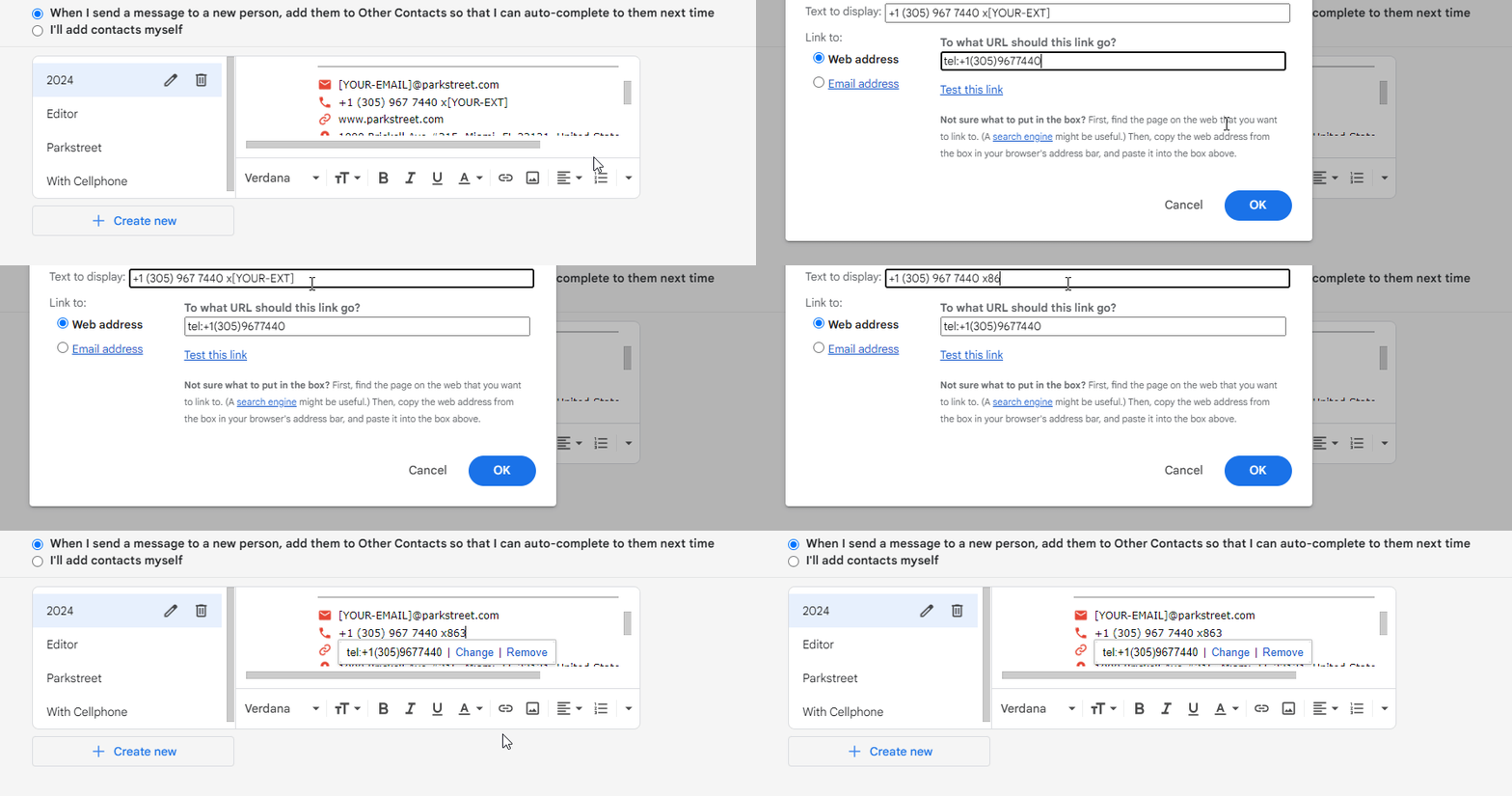
PS2: Same for your Phone Extension, hold your mouse cursor over the phone number and left click. This will bring up a small window, click “Change” and udpate ONLY the display text with your phone extension , then click OK.
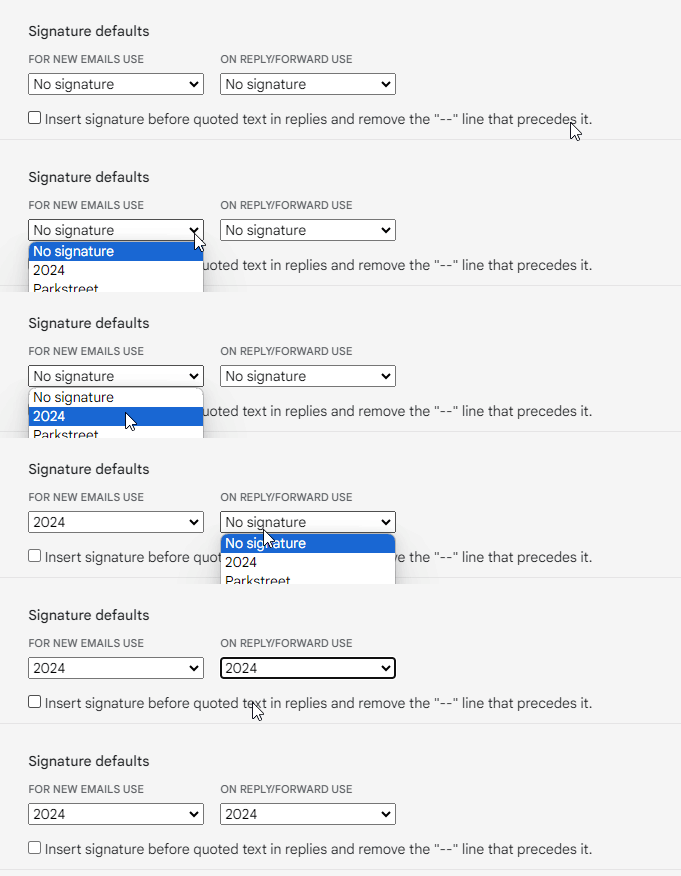
Make sure you have change the Signature defaults from None to your new signature.
Please note: The shipping disclaimer is not necessary for all departments, only those it is relevant for. If you are unsure ask your director for clarification
6.- Scroll to the bottom and click “Save Changes”