
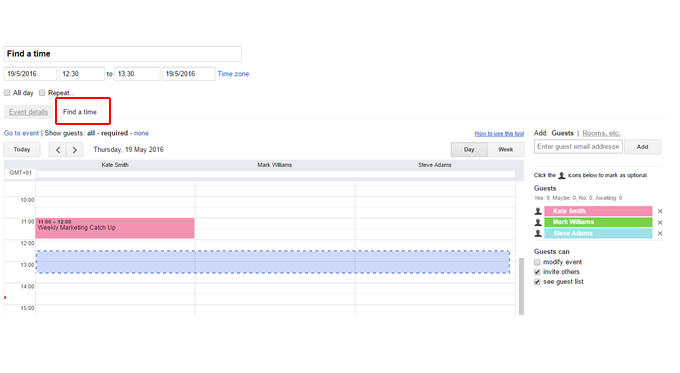
Note: The Find a time feature is only accessible via the web app, not the mobile Calendar apps.
To access Find a time in Google Calendar
- Create a new event, or edit an existing event
Add some guests in the Guests tab
- If the other guests' calendars are shared with you, you'll see their schedules.
- Click the Find a time tab.
- The calendars of your attendees will be displayed
The Day view is the default, select Week to see a week view
Use the arrows at the top to navigate between days/weeks
- To select a time, click the area within the calendar grid.
- The day and time will update for the event
Beware All-day events:
- All-day events are shown at the top of the calendar grid.
If a guest has an all-day event, they will appear available in the "Find a time" tab unless their event is set to show as "Busy."
To schedule an all-day event, click the Week button and then click the area at the top of a day column.